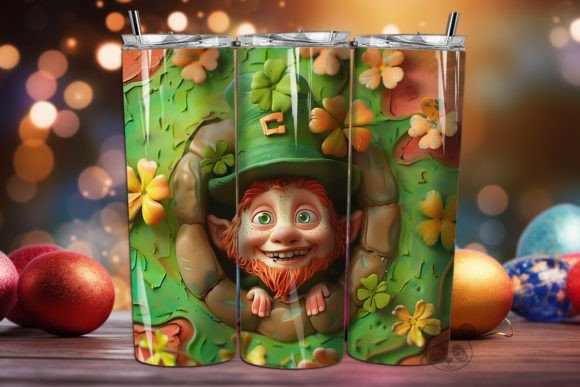
Mastering the St Patrick Leprechaun 3D Tumbler Wrap for Flawless Sublimation
The demand for personalized drinkware spikes every March, and few designs capture the festive spirit quite like a vibrant St Patrick Leprechaun 3D Tumbler Wrap. For creators, small business owners, and hobbyists, these digital assets offer a quick route to high-margin products. However, the difference between a best-selling item and a wasted blank often comes down to how you handle the digital file before it ever touches the heat press. Many beginners assume that downloading a PNG is enough, but successful sublimation requires a deeper understanding of resolution, sizing, and printer settings.
This guide addresses the common pitfalls associated with using St Patrick Leprechaun themed designs. By understanding what goes wrong and how to fix it, you can ensure your final product looks professional, colorful, and seamless.
Understanding the Digital Asset
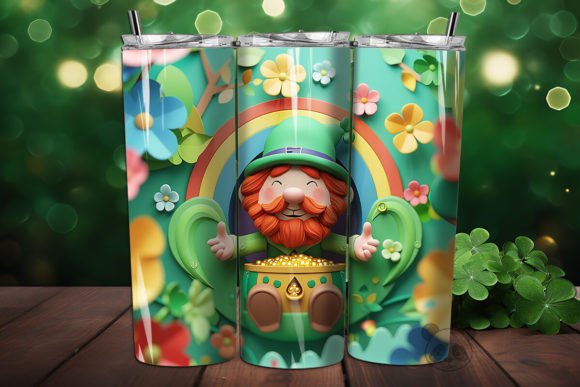
When you purchase an instant digital download, such as a St Patrick Leprechaun 3D Tumbler Wrap Background, you are buying a specific type of graphic file optimized for transfer printing. Typically, this comes as a high-resolution PNG file, often sized around 9.3 inches by 8.2 inches at 300 DPI. This specific dimension is designed to fit standard skinny tumblers, usually the 15 oz or 20 oz varieties.
The "3D" aspect refers to the visual depth created in the design—often featuring watercolor textures, shadows, and layered elements like hats, pots of gold, and cheerful leprechauns. It does not mean the file itself is a 3D model. It is a flat image engineered to look dimensional once wrapped around a cylindrical surface. Recognizing this distinction is crucial because it dictates how you prepare the file for printing.
Mistake 1: Ignoring Resolution and DPI Requirements
One of the most frequent errors creators make is ignoring the DPI (dots per inch) specification. A common misconception is that any image found online will print clearly. In reality, sublimation printing is unforgiving. If you attempt to upscale a low-resolution image or use a web-sized JPEG, the result will be pixelated and blurry.
The Impact: A blurry print looks amateurish and devalues your brand. Customers expect crisp lines, especially in detailed areas like the leprechaun’s facial features or the texture of a shamrock.
The Fix: Always verify that your downloaded file is 300 DPI at the intended print size. The provided Tumbler Wrap PNG should already meet this standard. Never resize the image up in your editing software; only scale down if necessary. If the design looks soft on your screen at 100% zoom, it will look worse on the tumbler.
Mistake 2: Misjudging the Seamless Pattern Alignment
Many St Patrick Leprechaun seamless pattern designs are created to wrap continuously around the tumbler. A critical oversight occurs when the creator fails to account for the seam overlap. If the design does not align perfectly where the edges meet, you will see a visible break or a double-printed line on the finished product.
The Impact: A misaligned seam disrupts the visual flow. For a 3D design relying on perspective, this break can ruin the illusion of depth.
The Fix: Use a Tumbler wrap template that includes bleed areas. Most professional templates allow you to visualize where the edges will join. When applying a St Patrick Leprechaun wrap, ensure that background elements extend slightly beyond the cut line. This "bleed" ensures that even if the wrap shifts slightly during application, no white gaps appear. Check the alignment digitally before printing by mocking up the wrap in your design software.
Mistake 3: Overlooking Color Management and Printer Profiles
Sublimation ink behaves differently than standard CMYK or RGB ink. Colors often appear duller on paper before pressing and then vibrant after heating. Beginners often over-saturate their images in an attempt to compensate, leading to muddy blacks and blown-out highlights.
The Impact: Incorrect color profiles result in greens that look brown or golds that look orange. For a St Patrick Leprechaun watercolor design, subtle gradients are key. Poor color management destroys these nuances.
The Fix: Calibrate your monitor and use ICC profiles specific to your sublimation paper and ink combination. Perform test prints on regular paper first to check color balance. Remember that the 3D background elements may require higher contrast to pop against the metallic or white surface of the tumbler. Adjust brightness and contrast slightly higher than you think necessary, as the sublimation process tends to mute colors by about 10-15%.
Mistake 4: Using the Wrong Blanks or Heat Press Settings
Even with a perfect St Patrick Leprechaun 3D Tumbler Wrap, the physical application can fail if the blank tumbler is not sublimation-ready. Only coated polyester blanks will accept the dye. Furthermore, temperature and time must be precise.
The Impact: Under-pressing leads to faint images that wash out. Over-pressing causes "ghosting" or burn marks, particularly on the handles or rims. Using a non-sublimation blank results in ink wiping right off.
The Fix: Verify that your blanks are specifically labeled for sublimation. Use a convection oven or a specialized tumbler heat press for even heat distribution. Follow the manufacturer’s guidelines for time and temperature, typically around 380°F for 180-200 seconds, but always test first. Ensure the St Patrick Leprechaun skinny Tumbler wrap is taped tightly and evenly to prevent shifting.
What to Check Before You Buy or Download
Before committing to a Digital Download, review the product details carefully. Look for the following:
- File Format: Ensure it is a PNG with a transparent background if required, or a full-wrap JPG/PNG as specified.
- Dimensions: Confirm the size matches your tumbler blank. A 15 oz tumbler requires different dimensions than a 20 oz.
- License Terms: Check if the design allows for commercial use. Most shop owners need to sell the finished physical product, so personal-use-only licenses will not suffice.
- Included Assets: Does the zip file include just the wrap, or also a matching lid insert or coaster? Bundled Sublimation Designs offer better value.
Optimizing Your Workflow for Efficiency
To streamline your production, organize your digital files logically. Create folders for each holiday or theme, such as "St Patrick's Day 2024." Store your St Patrick Leprechaun png files alongside your printer profiles and templates. This reduces setup time and minimizes the risk of selecting the wrong file during a rush order.
Additionally, keep a log of which blanks work best with specific designs. Some 3D Tumbler wrap designs look better on matte finishes, while others shine on glossy coats. Documenting these preferences helps you advise customers and maintain consistent quality.
By avoiding these common mistakes and focusing on technical precision, you can transform a simple St Patrick Leprechaun 3D Tumbler Wrap into a standout product. Attention to detail in the digital phase ensures success in the physical phase, leading to satisfied customers and a reputable brand.